Scrolling Twitter for 2XKO combos is a miserable way to spend your practice time. You open the app to grab one Vi route, and forty minutes later you’re three replies deep in a tier list argument and you still don’t have the combo.
There’s a better way. A developer named Fabby built findyourtech.gg — a site that pulls every tagged 2XKO combo clip off Twitter/X and drops it into one clean, filterable feed. No account. No algorithm. No replies. Just tech.
Here’s the full walkthrough, followed by a written breakdown of every filter — including the one setting most people get wrong.
What Find Your Tech actually does
Almost all 2XKO tech gets discovered by players grinding training mode and posted straight to Twitter with hashtags like #2XKO and #2XKO_VI. That’s where the combos live. The problem is that Twitter is a great place to post and a terrible place to search — there’s no way to tell it “show me only Vi routes from the current patch.”
Find Your Tech watches those hashtags and reorganizes everything by character, patch, and date. Every clip keeps a link back to the original post, so the player who found the tech still gets the credit and the engagement — you’re just skipping the scrolling.
How to use it, step by step
1. Jump to your fighter
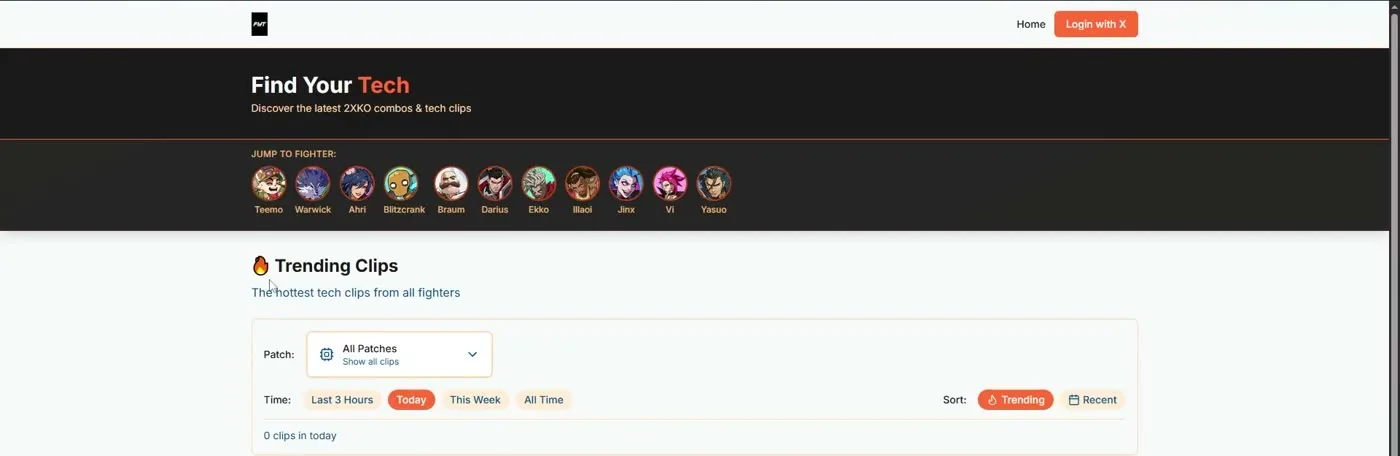
The Jump To Fighter row at the top is the fastest way in. Click your character and you land on their dedicated page — Vi’s reads “The Piltover Enforcer — Latest combos, setups, and tech clips.” Every fighter on the roster has one, and each page splits into two tabs: Tech (combo and setup clips) and Replays (full match footage).
2. Set the patch first
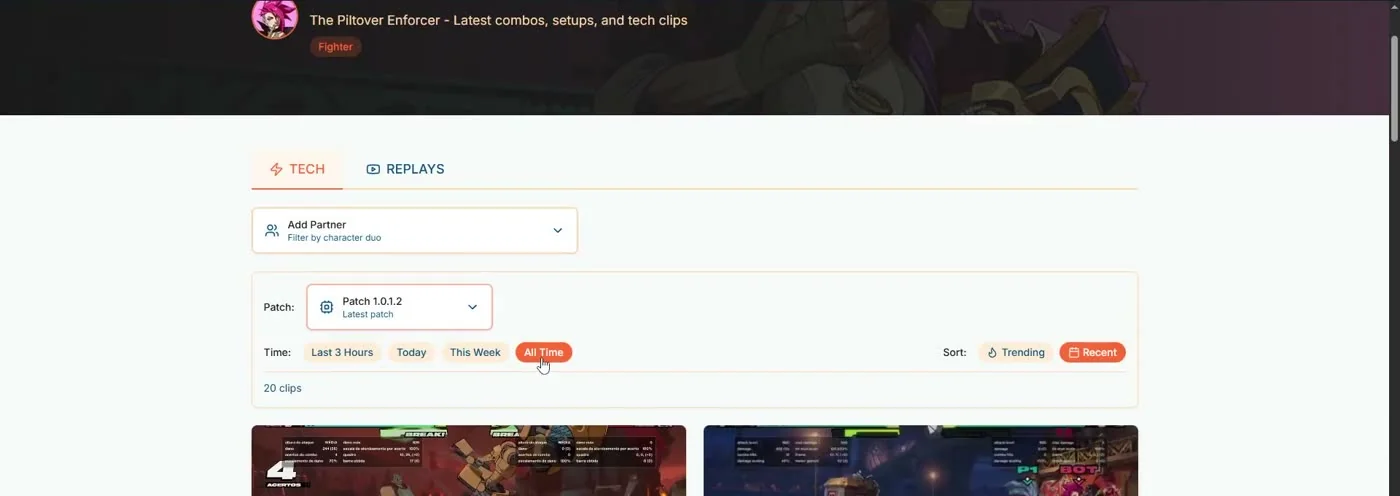
This is the step people skip, and it’s the one that matters most. The Patch dropdown defaults to showing everything ever posted. Set it to the current patch before you look at a single clip.
3. Widen the time range, then sort
Time gives you Last 3 Hours, Today, This Week, and All Time. Counterintuitively, All Time is usually the right pick once you’ve locked the patch — the patch filter is already doing the “is this still relevant?” work for you, so there’s no reason to throw away good routes just because they were posted three weeks ago.
Then choose your Sort: Recent shows the newest discoveries first, Trending surfaces what the community is actually reacting to. Start on Recent when you’re hunting for something specific, switch to Trending when you just want to see what’s good right now.
4. Filter by your actual duo
This is the feature that makes the site genuinely useful instead of just convenient. Open Add Partner and pick your second character, and the feed narrows to clips using that exact pairing.
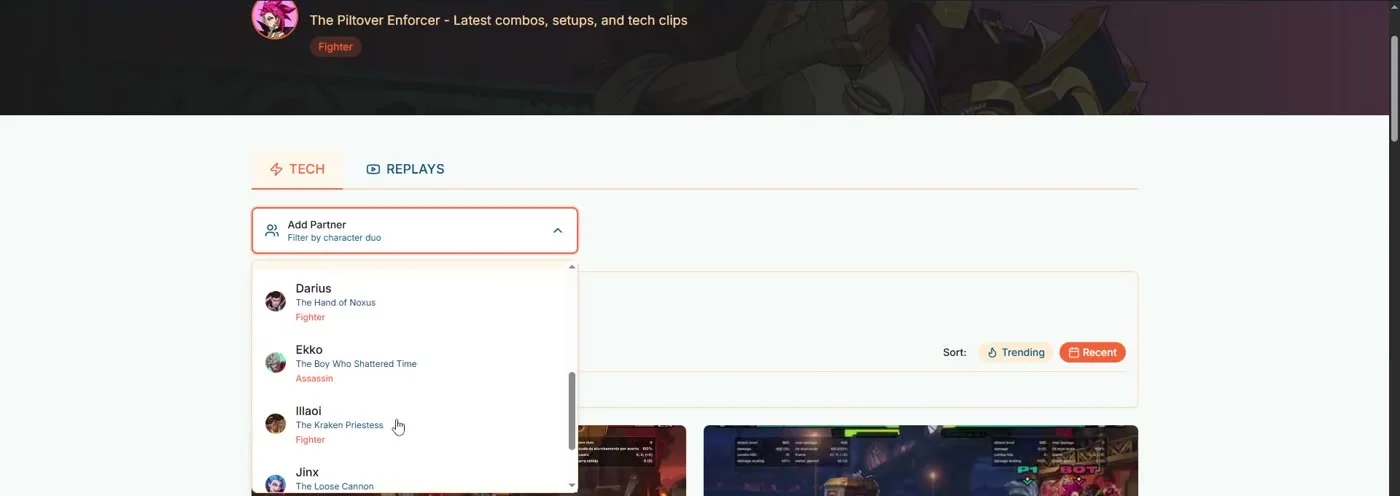
It matters because 2XKO combos are duo-specific. A Vi route built around a Jinx rocket assist is useless to a Vi/Braum player. Filtering to Vi + Jinx means every clip you see is a route you can actually take into the lab today.
5. Open the clip, then go to the source
Clicking a clip plays it with the poster’s original caption — which is where the actual notation usually lives. From there you can jump out to the Twitter post itself to ask questions, see replies (people often post corrections and easier variants), or follow the player who found it. The best tech accounts are worth following directly.
Why the patch filter is the most important button on the site
Fighting game combos have a shelf life. A single balance patch can change damage scaling, hitstun, or a special move’s recovery, and a route that worked perfectly last month suddenly drops halfway through.
Nothing is more demoralizing than spending an hour in training mode on a combo that cannot work anymore. If you take one thing from this whole article: set the patch dropdown before you watch a single clip. It takes two seconds and it protects your entire practice session.
The one thing it can’t do yet
There’s no way to filter by Fuse, and that’s the feature I want most. You can find every Vi/Jinx clip on the site, but you can’t narrow to only the ones running 2X Assist, and a Freestyle route often won’t transfer to a Double Down team at all.
I tried working around it with a browser search for “assist” and it doesn’t hold up — you get false hits from the word appearing in unrelated captions, and the count doesn’t update as more clips load in.
To be fair to the developer, this is a genuinely hard problem: the data isn’t there to filter on. Players tag their character, not their fuse — almost nobody is posting #2XAssist. Solving it would mean reading the fuse out of the caption text or the footage itself. Still, if it ever gets built, it’d be the single biggest upgrade to the site. (New to fuses? Start with the Fuses Explained guide.)
One honest warning
There’s a “Login with X” button in the corner. It didn’t work when I tried it, so I’d leave it alone — and more importantly, you don’t need it. Every filter, every clip, and every source link works completely logged out. Don’t hand over account access to a tool you don’t need an account for.
What to do once you’ve found a combo
Finding tech is the easy part now. Turning it into damage you can land under pressure is the actual work:
- Read the notation properly. Most captions are written in numpad notation. If 236H or 2MH means nothing to you, spend ten minutes on the numpad notation guide — it unlocks every combo post on the internet, not just these.
- Check it fits your fuse. Watch what the clip actually does on the tag. If they get two handshake tags and you’re running Sidekick, that route isn’t yours.
- Build it in pieces. Don’t run the full route from rep one. Land the ender, then the mid-section, then the starter — see the combo system basics for the structure.
- Drill it until it’s automatic. A combo you hit once in training mode is not a combo you own. Ten clean reps in a row, then take it into a real set.
- Know if the character is even worth the time. Check the current 2XKO tier list before you invest a week into a route.
The short version
- findyourtech.gg collects hashtag-tagged 2XKO combo clips from Twitter into one searchable feed — no account required.
- Filter by character, then set the patch first, then widen time to All Time.
- Use Add Partner so you only see routes for your actual duo.
- Click through to the original post for the notation, corrections, and to follow the player who found it.
- No fuse filter yet — check the tag timings in the clip yourself before you lab a route.
Big shout out to Fabby for building this and giving it to the community for free. It genuinely saves hours, and it means you never have to open Twitter to keep up with the tech.
Keep going
If you main Vi, these three go deeper on turning routes into real damage:
Found a route you can’t get consistent? Bring it to the 2XKO Jungle Discord and we’ll break it down together — or book a 1-on-1 session and we’ll lab it live on your own execution.